PROBLEM
For connections up to 100ft, you can use a 25, 50, or even a 100ft USB cable (link lets you choose the length).
In situations that require a connection cable run longer than 100ft, you will need to use the Ethernet connector on the back of the base receiver (insert photo of the back of the receiver) and TCP/IP protocol configuration on an existing network, or you'll have to create your own network to connect the computer and the receivers together to collect the votes.
SOLUTION
Toolkit app link - contact us at support@meridia.vote to receive a link to the Toolkit app.
Make sure to toggle the switch on the back of the receiver to NET position.
Section on existing network requirements: no DHCP, only Static IP, Subnet, Gateway, PoE requirements (adapters/injectors)
Section on new/temp network: PoE switches, Ethernet cables
Toolkit app screenshot
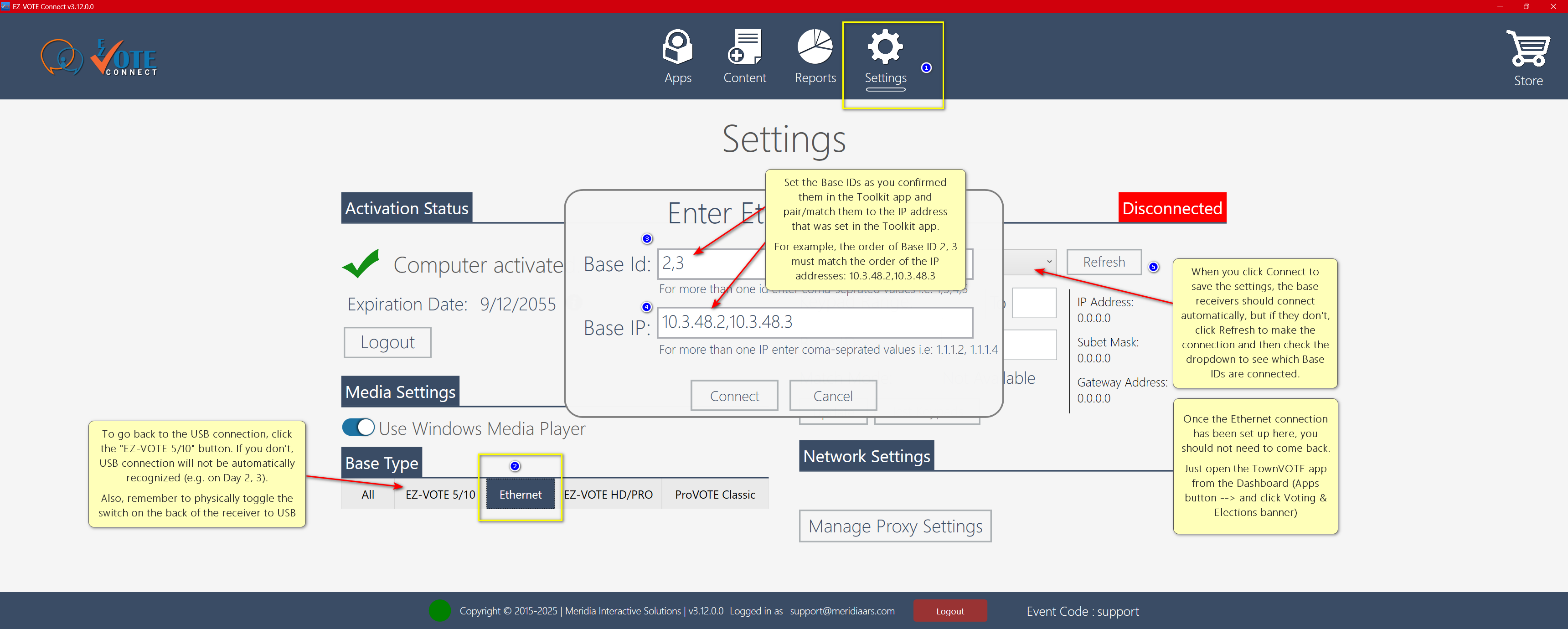
EZ-VOTE Connect Settings page (Ethernet connection) screenshot:
TIP: if you are using a longer cable, you should also consider getting a tripod to mount the receiver on (show a photo of a tripod screw on the receiver, or mounted receiver).
- tripod shelf (to use with an antenna booster)
Was this article helpful? Please leave your feedback below
Was this article helpful?
That’s Great!
Thank you for your feedback
Sorry! We couldn't be helpful
Thank you for your feedback
Feedback sent
We appreciate your effort and will try to fix the article