PROBLEM
You want to print the agenda from the agenda page in TownVOTE, to distribute at your meetings or for any other useful purpose.
SOLUTION
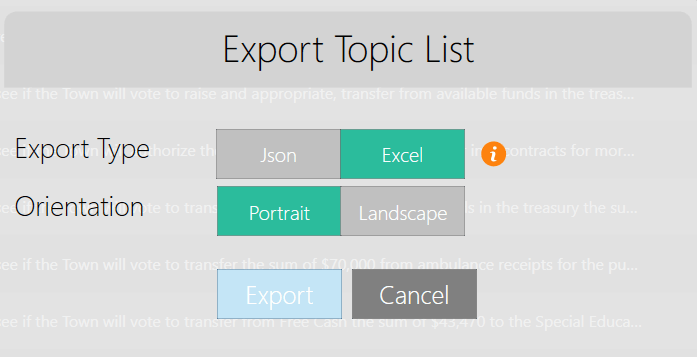
Start by creating or importing the .JSON file for your agenda. Then, when the agenda is completed, you can click on the export button of the agenda page. To print the agenda, you will want to choose the Excel file format when exporting. You will also want to select the Portrait orientation. Clicking export again from the pop-up window (shown below) will prompt you to save the agenda.
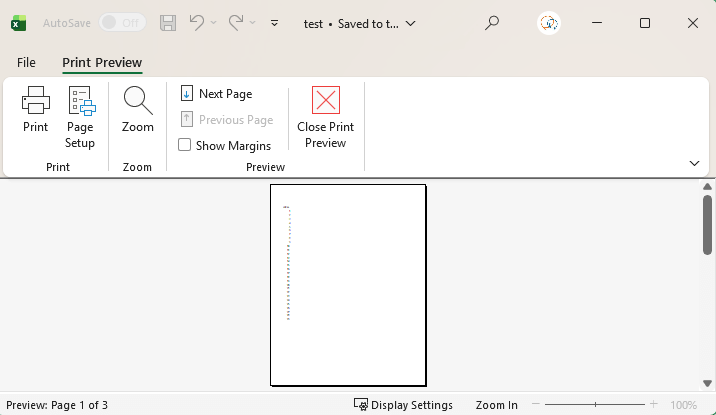
After saving the file in the desired location, you will automatically be redirected to Microsoft Excel's Print Preview (shown below) window. In this window, you can print the agenda page, save it as a PDF file, or press the escape button to edit the file in Excel.
YOUTUBE TUTORIAL
RELATED ARTICLES
How to Set Up an Agenda in TownVOTE
How to Access the Settings Panel in TownVOTE
Utilizing and Customizing Participants in TownVOTE
Checklist for Preparation for the Next Business (Town, City Council, Board) Meeting
Was this article helpful? Please leave your feedback below.
Was this article helpful?
That’s Great!
Thank you for your feedback
Sorry! We couldn't be helpful
Thank you for your feedback
Feedback sent
We appreciate your effort and will try to fix the article